
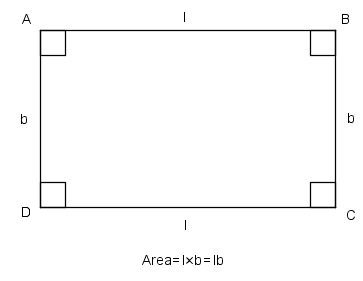
رسم المستطيل :
يتطلب رسم المستطيل تحديد طول وعرض المستطيل بالإضافة إلى تحديد div تحوي هذه المستطيل
كما يتطلب تحديد الأضلاع التي تشكله وهي عبارة عن إطار
[php]
<!DOCTYPE html>
<html lang="en">
<head>
<title>rectangle</title>
<style>
#rec {height:200px;width:300px;border:1px solid red;}
</style>
</head>
<body>
<div id="rec"></div>
</body>
</html>
[/php]
ويمكن إضافة لون خلفية إلى المستطيل
[php]
<style>
#rec {height:200px;width:300px;border:1px solid red;background-color:rgb(187, 34, 0);}
</style>
[/php]
ولرسم مربع يمكن جعل الطول والعرض متساويان
..أما لرسم الدائرة فيجب أن يكون الطول والعرض متساويان والإطار دائريا بمقدار نصف الطول والعرض
مثال يجمع الأشكال الثلاثة :
[php]
<!DOCTYPE html>
<html lang="en">
<head>
<title>polymorphisims</title>
<style>
#rectangle {height:200px;width:300px;border:1px solid red;margin-bottom:10px;}
#square {height:200px;width:200px;border:1px solid red;margin-bottom:10px;}
#circle {height:200px;width:200px;border-radius:50%;border:1px solid red;}
</style>
</head>
<body>
<div id="rectangle"></div>
<div id="square"></div>
<div id="circle"></div>
</body>
</html>
[/php]
تعيين قيم الطول والعرض للأشكال عن طريق الإدخال من قبل المستخدم :
يتم تعيين الطول والعرض من خلال مربع الادخال
[php]
<input id="height" type="text" placeholder="height" />
<input id="width" type="text" placeholder="width" />
[/php]
يتم الحصول على القيم المدخلة من خلال التابع drowrec()
يتم الحصول على الطول والعرض من خلال القيم المدخلة والوصول غليها عن طريق الـ id
[php]
var w=document.getElementById("width").value;
var h=document.getElementById("height").value;
[/php]
المتغير y هو متغير يقوم بإضافة div لها المواصفات التي حصلنا عليها من المدخلات
[php]
y+=’
<div style="width:’+w+’px;height:’+h+’px;border:1px solid red;"></div>
‘;
[/php]
وهكذا يصبح البرنامج على الشكل التالي:
[php]
<!DOCTYPE html>
<html lang="en">
<head>
<title>rectangle</title>
</head>
<body>
<div id="rec">
<div>enter the width and height of the rectangle:</div>
<input id="height" type="text" placeholder="height" />
<input id="width" type="text" placeholder="width" />
<button onclick="drowrec();"> drow </button></div>
<div id="rectangle"></div>
<script>
function drowrec(){
var w=document.getElementById("width").value;
var h=document.getElementById("height").value;
var y="";
y+=’
<div style="width:’+w+’px;height:’+h+’px;border:1px solid red;"></div>
‘;
document.getElementById("rectangle").innerHTML = y;
}
</script>
</body>
[/php]
المثال التالي يحوي رسم للأشكال الثلاثة عند الضغط على زر الرسم :
[php]
<!DOCTYPE html>
<html lang="en">
<head>
<title>polymorphisms</title>
</head>
<body>
<div id="rec">
<div>enter the width and height of the rectangle:</div>
<input id="height" type="text" placeholder="height" /> <br />
<input id="width" type="text" placeholder="width" /> <br />
<button onclick="drowrec();"> drow </button>
</div>
<div id="sq">
<div>enter the side of the square:</div>
<input id="side" type="text" placeholder="side" /> <br />
<button onclick="drowsq();"> drow </button>
</div>
<div id="sq">
<div>enter the radius of the circle:</div>
<input id="radius" type="text" placeholder="radius" /> <br />
<button onclick="drowcir();"> drow </button>
</div>
<div id="rectangle"></div>
<div id="square"></div>
<div id="circle"></div>
<script>
function drowrec(){
var w=document.getElementById("width").value;
var h=document.getElementById("height").value;
var y="";
y+=’<div style="width:’+w+’px;height:’+h+’px;border:1px solid red;"></div>’;
document.getElementById("rectangle").innerHTML = y;
}
function drowsq(){
var side=document.getElementById("side").value;
var y="";
y+=’<div style="width:’+side+’px;height:’+side+’px;border:1px solid red;"></div>’;
document.getElementById("square").innerHTML = y;
}
function drowcir(){
var r=document.getElementById("radius").value;
var e="";
e+=’<div style="width:’+2*r+’px;height:’+2*r+’px; border-radius:50%;border:1px solid red;"></div>’;
document.getElementById("circle").innerHTML = e;
}
</script>
</body>
[/php]